 I know what a lot of you are thinking..
Why should we consider Google plus because it’s obvious that Google has lost the social network war and Google plus is not going to be another Facebook.
That’s true but….
Why will less users on Google+ be a good thing
A community of 1,000 people interested in your products and services is 1,000 times better than a community of a 1,000,000 people that’s not.
As Google plus declines in numbers (and this will happen) it will consist of a lot of people that are passionate about the communities they are involved in.
This means you’ll have some really strong passionate communities who you can build relationships with and ultimately sell your product and service.
Think about the biggest problem with Facebook and Twitter…….too much noise!!!
…..Less people means less noise.
It’s a not a platform for everyone but there is still value in any community that has the audience you want to attract!
5 Tools to Grow Your Presence on Google+
Ok….
Now that all that negativity is gone…..
1. Circloscope – Manage Your Circles Effectively
In Google+ you manage your network connections through Circles.
For example, you could have your friends in one circle and your business contacts in others.
When you are sharing content you can specify which circles sees the content you share.

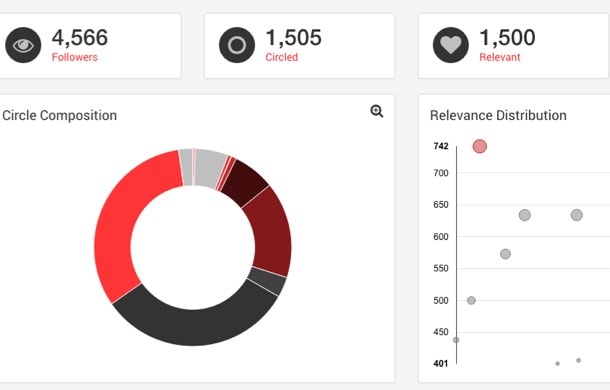
Circloscope helps you manage your circles more effectively. Here are some of the things you can do in Circloscope:
- View an overview – See how many people in each circles, relevance of people in your circles etc.
- Create circles based on people engaging in a post, being part of a community or an event
- Analyze the people in your circles and remove as required
- Import people based on Google+ id or email so you can add them to circles
Here’s an example dashboard for Circloscope:
2. Post at the right time using Timing +
To get maximum benefit from posting across any of the social networks you really need to work out the timing correctly. If you are posting your most important content at a time when your followers are not online you are missing out.
Timing + analyses your last 100 posts on Google Plus to identify the best time to post.
It will show you the best times for each days and also show you what were your most popular posts.

Very simple tool, you just login via your Google + account and it analyses your posts.
If you post at the right times this will help with engagement which will result in more followers.
3. Find new people using Circlecount
Circle count is a Google + profile analysis tool to provide you with detailed analysis on Google + profiles.
- View details of engagement on your profile, what were your top posts shared, your followers growth etc.
- View details of other profiles and find out who is getting the highest engagement, most followers etc.
- Find profiles and communities worth connecting to.
You can view standard statistics provided and run various searches by user, location and/or keyword to find details of Google + users.

4. Detailed analysis using Nod3x – No longer Available ***
Nod3x is an analysis tool for several platforms including Google+.
It tries to identify:
- who is influential within your chosen topic area
- who is engaging your niche
- what words are people using when discussing your chosen topic
- when is your topic seeing the most engagement
- where are people talking about your content
- how are people engaging
Here’s a word cloud generated showing topics discussed in relation to social media.

You can also do competitor analysis. Analyze what time of day works best, day of the week, hashtags used etc for each competitor.
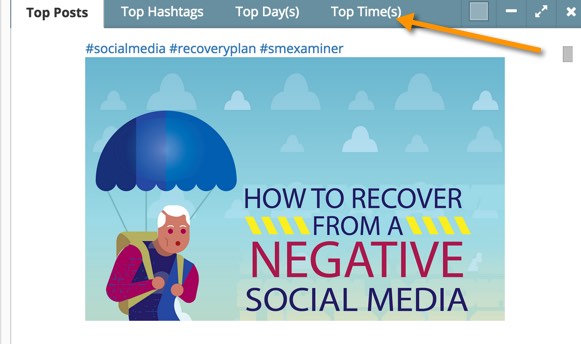
If you understand your competitors and landscape you operate in this will help significantly building your followers.
5. View Detailed Statistics for a User Using Allmyplus
Allmyplus allows you to search for a particular user on Google + and display detailed information on this user. Such as the posts they made, when they made them, the interactions they had and much more. Picking a popular Google + user in your niche will help you understand how they grow their following.
The following is an overview graph. When you run a report in Allmyplus you can click on any individual element to view more details.

Summary
Google+ may not be the most popular social network in the world but if your ideal customers are on Google+ it could be the best place to connect and build a relationship with them.
So… what is your opinion of Google+ and tools we have shared?